Transparent Floating Keyboard keeps background apps visible while typing
Transparent Floating Keyboard from 주엠케이아이디어박스 gives Android users a translucent, movable typing surface designed to preserve screen real estate and show underlying content. The app overlays a floating keyboard so background apps keep their original layout, and it emphasizes per-device customization of transparency, position, and layout. Tablet and foldable owners who need to reference maps, videos, or documents while typing are the primary audience for this tool. That approach keeps source content visible during data entry and reduces context switching for multitaskers.
How the keyboard preserves app layout while you type
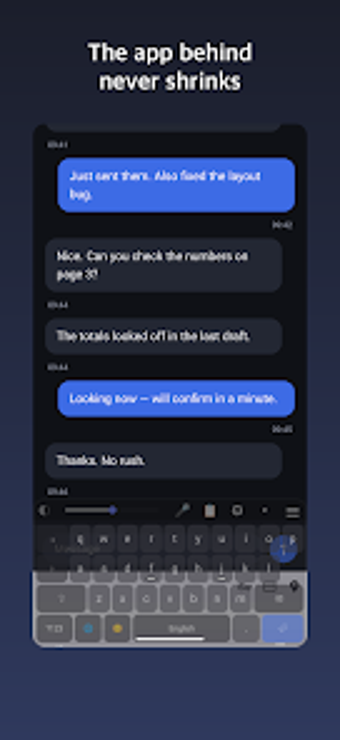
The keyboard floats above running applications instead of resizing them, which preserves the original app dimensions and layout. This zero-shrink behaviour lets you read maps, watch video, or edit documents while typing. A visible handle (≡) on the top-right allows dragging to a new position, so the panel can be moved vertically or horizontally without forcing the background app to redraw.
How the overlay behaves on large screens
The tool is optimized for wide displays and foldable phones, so its overlay model suits large-screen workflows. Split keyboard mode pins keys to opposite edges for ergonomic thumb typing on wide devices. Because the interface sits over content rather than pushing it, the app avoids the typical upward shift that standard keyboards cause on desktop-class mobile devices.
Can I interact with apps behind the keyboard without losing input focus?
Touch-through functionality forwards touches made outside the keyboard panel or in the empty middle of the split layout directly to the app beneath. That allows tapping map locations or video controls without dismissing the keyboard. The design preserves input focus while supporting background interaction, so you can reference live content and continue typing with minimal context switching.
How much setup and technical knowledge does it require?
Controls are built into the keyboard: a top-bar slider adjusts transparency from 0% to 99%, and key dimensions can be tuned from 70% to 150% height and 60% to 100% width. The app supports 11 layouts, home-row tactile markers for F and J, and advanced keys such as Tab and Caps Lock plus haptic feedback toggles. Casual users can start by moving the panel and adjusting the slider; advanced users can fine-tune size and layout.
Clear choice for multitaskers on large screens
This keyboard is a practical option for foldable and tablet users who need persistent on-screen reference. Its design rewards users who spend time adjusting position and sizing, a brief configuration trade-off that pays off during extended multitasking. People seeking immediate, no-setup typing may find the initial calibration inconvenient. Consider scheduling the setup during a moment of low activity so the keyboard feels natural during regular use. Recommended.